
Brands lean on pixels and cookies for almost everything— attribution, retargeting, personalization, even lifecycle triggers. But most teams never pause to understand the difference: pixels fire events; cookies store state. And in 2026, both keep hitting the same walls as Chrome, Apple, consent requirements, and new privacy regulations shrink what the browser is allowed to do.
That’s why identity becomes the layer you fix first. When you resolve more sessions into real, verified profiles before a pixel fires or a cookie loads, everything downstream becomes more stable.
Tie sits exactly in that upstream layer. It identifies visitors the moment they land, enriches those profiles with reliable fields, and protects inbox reputation so that the signals you push into Meta CAPI, Google Enhanced Conversions, Consent Mode, and your CRM/CDP actually match, rather than disappearing.
The debate isn’t “pixels vs. cookies.” The real question is: how much identity can you capture upstream so pixels and cookies don’t have to work alone?
Pixel vs cookie
Pixels and cookies often get grouped together, but they solve two separate problems. Pixels help you send precise signals for pixel tracking, reporting, and advertising purposes. Cookies give you persistence so you can maintain carts, preferences, and identity across visits.
Before you decide what to deploy or replace in your digital marketing stack, you need to understand the exact function each plays within the user’s browser.
What are pixels?
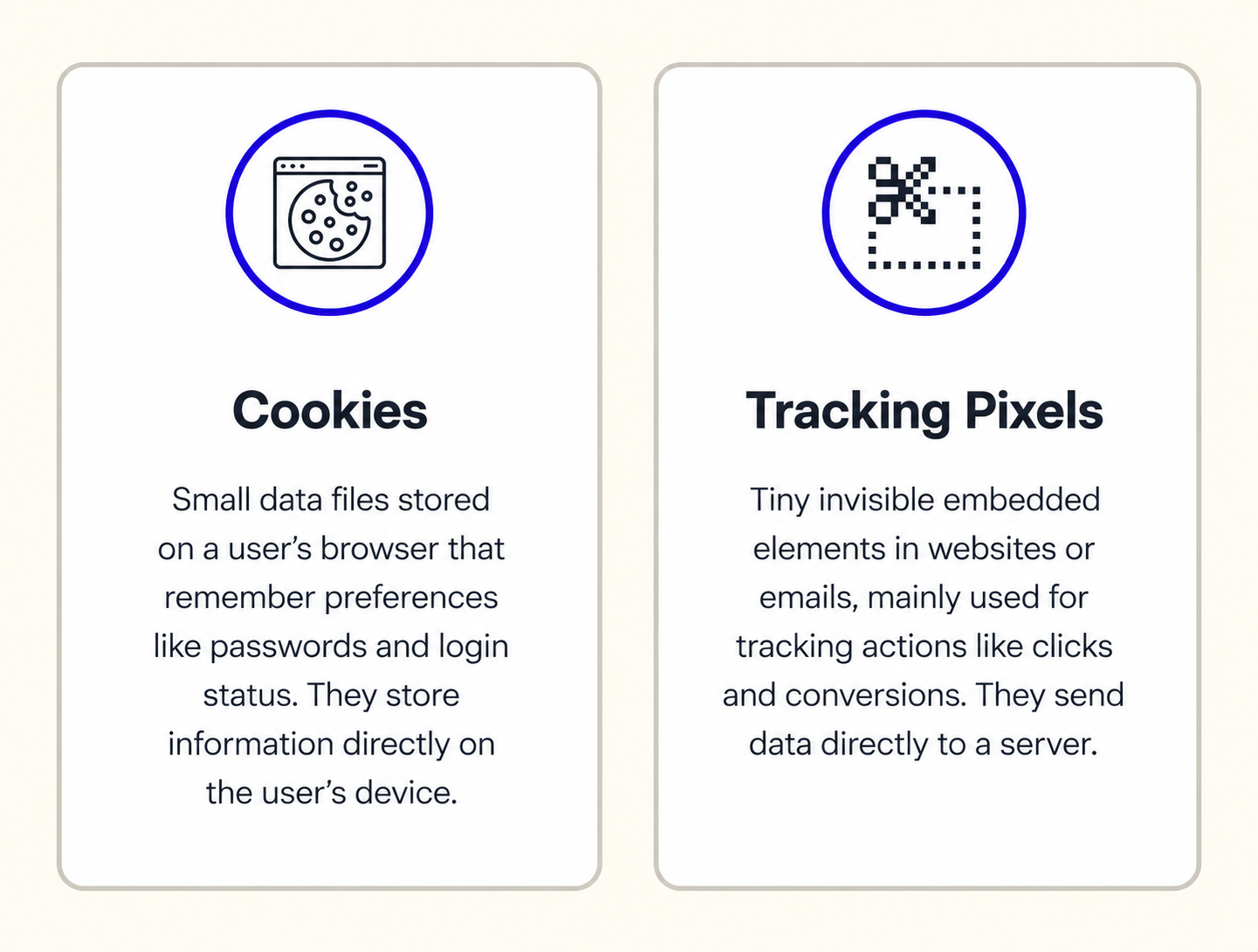
A tracking pixel is a small HTML or JavaScript snippet that fires an event the moment a user interacts with a webpage. You use it to collect data about user behavior in real time, such as pageviews, scrolls, adds to shopping cart, and checkouts.
A pixel doesn’t store anything on the user’s device. It only sends an event from the user’s browser to a server. That’s why pixel tracking still works even when third-party cookies disappear in Google Chrome or Apple browsers.
You rely on pixels when you need:
- A clean conversion signal for digital advertising, email marketing, or remarketing.
- Event data for tools like Google Analytics, Facebook Ads, or server-side pipelines.
- Fast reporting without depending on storage rules or privacy regulations.
What are cookies?
Cookies are small text files stored in the web browser. They don’t track anyone on their own. They only become tracking signals when a script reads them and sends that data back to a server.
You use first-party cookies to:
- Keep carts active between user visits.
- Recognize the same browser when they return.
- Maintain login sessions or preferences that shape user experience.
- Support marketing strategies that need persistence across different websites or sessions.
A cookie stays idle until a tag or script reads it. Once it’s read, it can link actions across visits but only with proper GDPR and CCPA consent. That’s why consent banners exist. Without permission, you can’t use cookies for advertising or cross-site retargeting.
Difference between a cookie and a pixel
You use cookies and tracking pixels for different functions within the user’s browser. A cookie stores state. A pixel sends an event. When you separate these roles, you get cleaner attribution, stronger data privacy controls, and fewer surprises as Chrome and Apple restrict third-party cookies.
What a cookie actually does
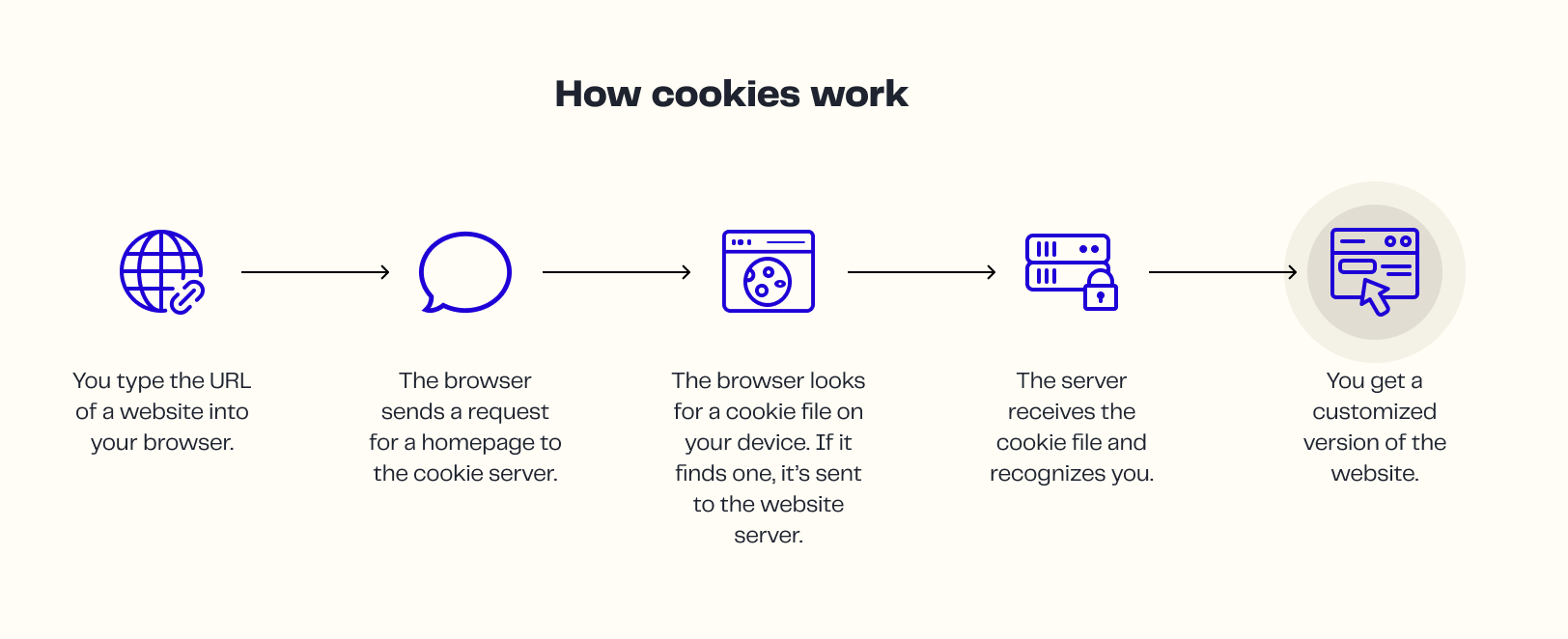
A cookie is a small text file stored in the web browser. You use it to keep shopping cart values, sessions, or preferences through repeat user visits.
It doesn’t move data by itself. Instead, a script must read it. It can be first-party cookies or third-party cookies. However, the latter is being phased out under privacy regulations like GDPR and CCPA.
That is the part that most teams miss when they plan marketing strategies or map data collection flows.
What a pixel actually does
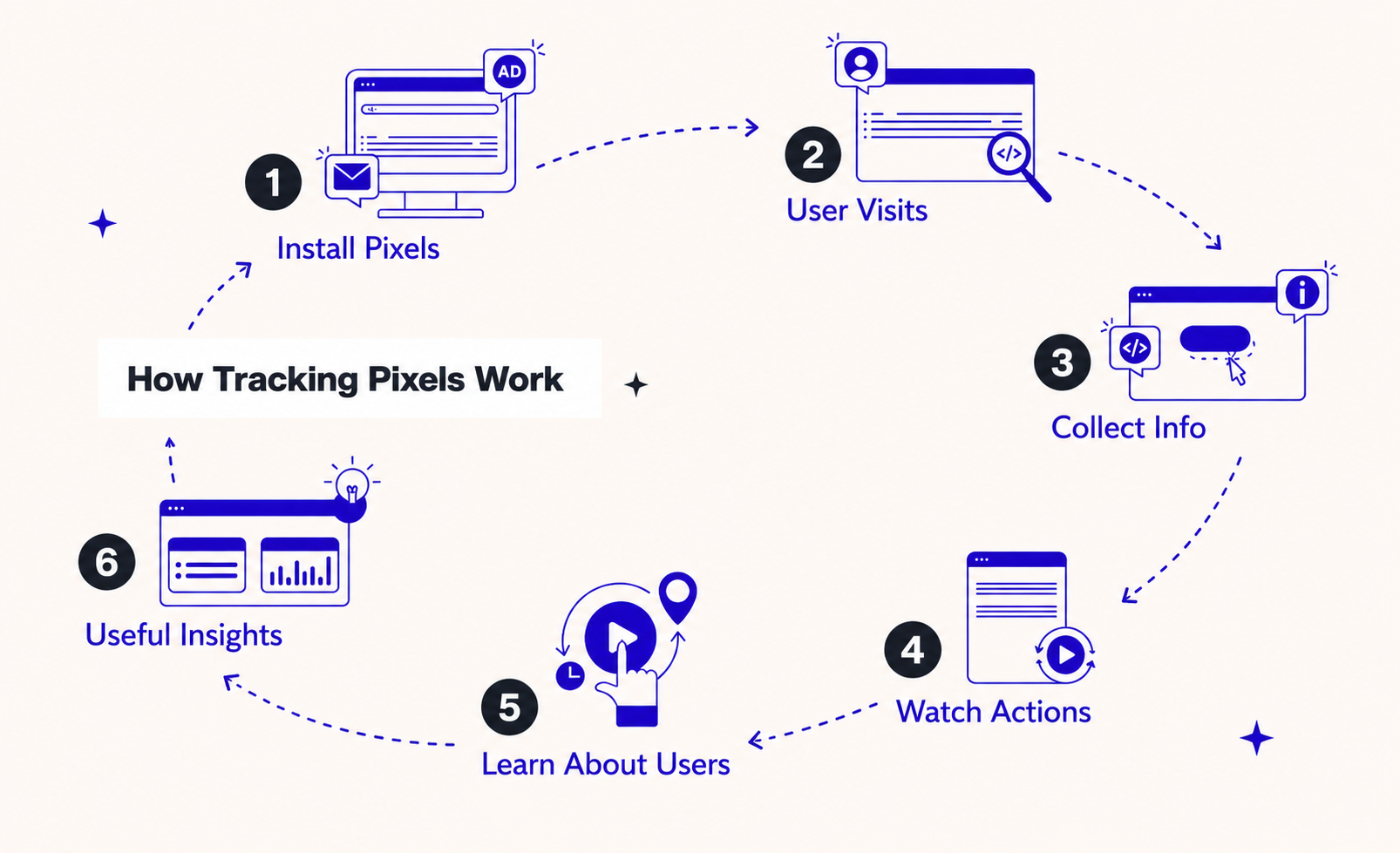
A tracking pixel works very differently. It fires a network call, often an HTML tag or JavaScript snippet, that reports what just happened on a specific page. It sends fields such as IP address, URL, timestamp, or product IDs.
You see this in pixel tracking for Google Analytics, email marketing, Facebook ads, social media, retargeting, and remarketing. Pixels help you collect data without depending on cookies, which is critical as Google Chrome and Apple restrict third-party cookies.
What “tracking pixel cookie” actually means
You might see the phrase “tracking pixel cookie”, but there’s no special cookie type with that name. It usually refers to a standard helper cookie a pixel uses for things like deduplication, attribution, or session continuity. It’s still just a regular cookie, nothing more.
Getting this language right matters. When teams mix up terms, it creates governance issues and confusion during audits, privacy reviews, and data-protection checks. Precision keeps your tracking compliant and your documentation clean.
What tags and SDKs have changed in practice
A pixel is only one kind of tag. A “tag” can load code, write cookies, fire pixels, or run an SDK. The tool you choose does not control compliance. Your data contracts do.
Start by tightening your cookie governance. Reduce tag bloat, document purpose, track how long cookies remain active (their Time to Live, or TTLs), assign owners, and define lawful bases. This prevents hidden cookie writes, protects user privacy, and keeps your user experience smooth.
Retargeting & measurement realities
Retargeting has moved far beyond the old tracking pixel vs cookie setup. You now rely on first-party IDs and API-based pipes like Meta CAPI and Google Enhanced Conversions. If identity coverage is weak, pixels won’t rescue performance. You’ll hit frequency caps fast, and your retargeting pools stay small.
For measurement, treat server-side events as your primary signal. Use a unique “event_id” for dedupe. Keep the client pixel as a fallback for browser gaps. Run controlled holdouts, so modeled conversions don’t distort your decisions. You want real lift, not algorithmic noise.
Consent-safe implementation choices
You need a setup that respects consent without breaking coverage. That’s where pixel tracking vs cookies requires precision.
- Use Consent Mode (or an equivalent framework), so browser pixels follow cookie consent choices.
- Keep server-side events active for permitted aggregated or necessary uses.
- Minimize cookie scope and TTL; keep them short and purpose-specific.
- Never store PII in cookies; use hashed or scoped IDs instead.
This keeps your data protection, GDPR, CCPA, and privacy laws posture clean while maintaining enough signal to support your marketing strategies.
Performance, reliability, privacy tradeoffs
You see the real key differences between cookies vs pixels when you evaluate reliability, compliance, and speed.
- Reliability:
- Server-side + durable IDs survive ad blockers, storage limits, and browser resets.
- Short-TTL cookies still support session continuity where permitted.
- Browser-only setups break as soon as consent is declined or storage is blocked on the user’s device.
- Privacy and compliance:
- Cookies require explicit purpose, consent routing, and strict retention windows under GDPR and CCPA.
- Pixels require a lawful basis for transferring user data to endpoints, even if the call uses an invisible image or HTML tag.
- Both need a complete data inventory for audits and long-term data protection.
- Page speed:
- Load tags async to protect user experience.
- Fire pixels after interactions, not before.
- Move business-critical events server-side to shrink load on the web browser and optimize performance.
Facebook pixel cookies in 2026 (updated)
You no longer treat Facebook pixel cookies as your primary tracking path. The browser pixel still fires from the webpage, but Meta now expects you to run Conversion API (CAPI) with “event_id” dedupe as your main pipeline.
This shift reflects how Meta is adapting to blocked third-party cookies, strict privacy regulations, and the collapse of cross-site tracking across Google Chrome, Apple, and other engines.
Prefer CAPI and event_id dedupe with hashed match keys
Meta now reads server events more reliably than browser fires. You send each CAPI event with:
- A unique “event_id”
- Hashed match keys (email, phone, or other scoped identifiers)
- Minimal fields
- No raw PII
The tracking pixel still fires, but it only fills gaps when CAPI misses an interaction. You avoid overcounting by linking both paths with the same “event_id”. This prevents modeled conversions from inflating lift and keeps your digital marketing reporting clean.
You also reduce dependency on cookies entirely. When the pixel fires, it carries an event, not identity. Your identity lives in your server pipe.
Inventory and govern every Facebook pixel cookie name
You need a clear inventory of each Facebook pixel cookie name, its TTL, and its purpose. This is now mandatory if you want your cookie consent disclosures to match reality under GDPR, CCPA, and similar privacy laws.
The logic is simple:
- List every cookie that the pixel or embedded Meta code writes.
- Verify that each cookie stops when the user declines consent.
- Confirm TTLs actually match what your CMP discloses.
- Remove any cookie that performs a function you no longer need.
Most teams fail here because they assume Meta’s code only writes a single cookie. In practice, you may see several helper cookies for dedupe, click-mapping, or session stitching.
First-party vs third-party: what actually happens in 2026
Meta now leans heavily on Facebook pixel first-party cookie behavior. It still supports Facebook pixel third-party cookies, but modern browsers isolate or block them.
While the Facebook Pixel continues to write cookies, modern implementations treat them as first-party helpers instead of third-party identifiers.
Here’s the reality in 2026:
- Meta has shifted toward first-party helpers plus CAPI.
- The pixel still writes cookies as first-party cookies when possible.
- Some third-party cookies may still appear inside older embeds, iFrames, or legacy HTML social plugins.
- Cross-site behavior is far weaker because browsers isolate or partition these values.
Third-party contexts still appear in some flows, but they’re unreliable. Your governance should prefer first-party helpers with short TTLs and server-side events, replacing anything that depends on cross-site access.
Read about the different types of data and how to leverage them to personalize experiences, improve targeting, and grow your business.
Why you shouldn’t get email addresses from cookies
If an email didn’t come from an explicit opt-in, you cannot use it:
- Not for matching.
- Not for uploads.
- Not for automation.
Pro-tip: You should never store raw email addresses or reconstructed identifiers in first-party cookies. This is a direct violation of the GDPR and the CCPA because the user never agreed to be identified through background storage.
You also avoid anything that resembles buying a list of email addresses to track their cookies. These lists collapse under scrutiny because they’re built without clear consent lineage. Using them damages your deliverability, reduces trust, and puts your email marketing at long-term risk.
Do this instead
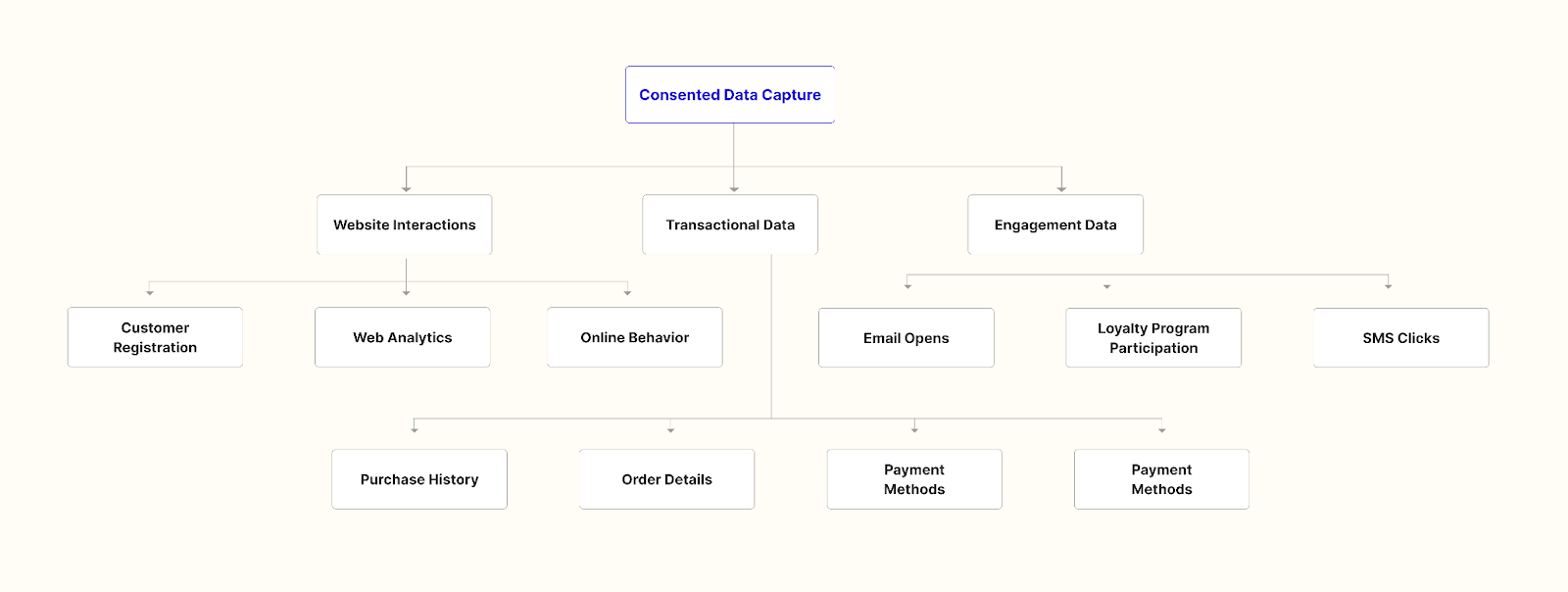
Capture verified, consented emails through value exchanges that users actually want. You do this in clear, compliant, first-party contexts that users understand.
Here’s what you can do:
- Use on-site quizzes to collect intent and capture an email once the user sees value in the result.
- Add back-in-stock alerts so high-intent shoppers share their email willingly.
- Use warranty or product registration to convert buyers into known profiles.
- Turn post-purchase flows into moments where users offer their details to unlock receipts, tracking, or support.
- Offer loyalty benefits that make identity collection feel natural, not forced.
This gives you a stable identity for email marketing, retargeting, attribution, and digital marketing workflows without relying on fragile browser storage or questionable tracking technologies.
What to ship first
Reduce risk and improve signal quality by fixing the foundation before you compare pixels vs cookies or add more tags. Start with changes that strengthen delivery, identity, and consent posture.
This is where tools like Tie can help you out. It resolves anonymous sessions into consented profiles the moment visitors land, then enriches them so your server-side events carry stronger match keys into Meta, Google, Klaviyo, and your CRM.
Book a call with Tie to get a clear view of where your signal breaks.