.png)
Most ecommerce stores convert only 2–3% of visitors into buyers. Even among shoppers who add products to their cart, roughly 70–77% leave before completing their purchase. That leaves a much larger group hiding in plain sight: visitors who browse products, compare options, show signs of intent, and leave without ever reaching the cart.
Most brands try to fix this by sending a reminder. This approach barely scratches the surface.
In 2026, the real work is upstream. You need to increase how many of those visitors you can actually identify, enrich their profiles with real signals, and then send only when the intent is strong enough to justify hitting their inbox. That’s what keeps your domain healthy and optimizes the precision of every browse abandonment email you deliver.
Identity, data enrichment, and controlled send rules outperform any clever template. Tools like Tie plug in upstream, expand your eligible audience, improve signal quality, and help you run browse abandonment email best practices without risking inbox placement.
“Using programs like Tie really helps ensure no one slips through the cracks and that we capture as much data as possible.”
- Morgan Mulloy, Senior Client Partner at Avex Designs
In this blog, you’ll learn how to build that system: clean triggers, reliable identity, safe timing, and the exact rules that make browse flows work in 2026.
What is browse abandonment?
Browse abandonment happens when a visitor views specific products or categories but leaves before making a purchase. It happens between low-intent skimming and high-intent add-to-cart behavior.
The customer journey is broken into four intent levels:
- Site abandonment: Brief visits to broad pages like the homepage or a category.
- Browse abandonment: Multiple PDP views, deeper scroll, or clear category exploration.
- Product abandonment: Strong interest in one SKU without adding to cart.
- Cart abandonment: Items added to cart, but no checkout progress.
Each step reflects a different level of commitment. Browse abandonment is the point where shoppers are evaluating options, comparing details, or encountering friction. They’re interested, but not committed.
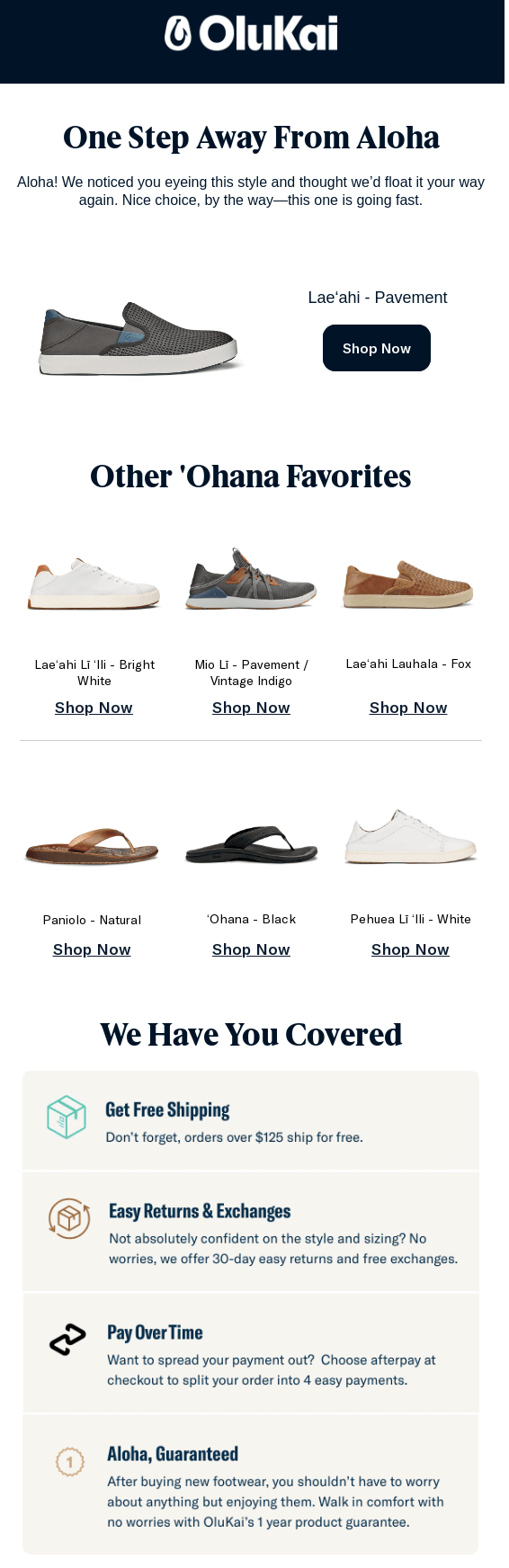
One browse abandonment email example is Olukai. Instead of pushing a discount, the email reintroduces the exact product the shopper viewed and pairs it with a subtle urgency cue ("this one is going fast"). It then expands the decision set by showing similar products from the same category, giving the shopper more options without forcing them back to a single SKU.
Browse abandonment emails vs. cart abandonment emails
Browse abandonment triggers when a visitor views products or categories but never adds anything to the cart (window shoppers).
On the other hand, abandoned cart emails trigger when the visitor adds items to the cart and then stops. This is a far stronger signal.
Difference between browse abandonment emails and cart abandonment emails
For example, if someone views three hoodies, checks sizing, and leaves, send a browse abandonment email with the hoodie they spent the most time on and two relevant substitutes.
If that same visitor later adds a hoodie to their cart, cancel the browse abandonment email and move them into the cart recovery flow. This aligns with their current intent and keeps your messaging consistent and relevant.
When you treat these two stages separately, you avoid over-sending, protect email deliverability, and recover more revenue across the funnel, especially from repeat buyers who respond strongly to well-timed browse nudges.
Does browse abandonment only show one product?
You shouldn’t limit browse abandonment to a single product unless the visitor only viewed one SKU. Most shoppers explore a product category, compare variants, or move between similar items. Your email should reflect that behavior.
A strong browse abandonment email includes elements closely related to the exact session. That usually includes:
- The most recently viewed product image.
- The product with the highest dwell time.
- One or two close substitutes.
- A relevant bestseller from the same category.
- A call to action (CTA) that drives action.

The email should give the visitor a clear next step, especially if their session shows comparison behavior. If someone looked at several sizes, colors, or variants, your content should mirror that and remove friction, not push a random SKU.
The only time you show a single product is when the visitor’s session is tightly focused on one PDP, with long scroll depth and clear interest in one SKU. In every other case, a small set of relevant alternatives drives more clicks because it acknowledges how shoppers browse today.
How does browse abandonment work?
Browse abandonment works by detecting high-intent browsing behavior and triggering a low-pressure follow-up based on that pattern. The process has three parts: the signal, the identity, and the response.
1. Capture strong intent signals
Track the actions that show evaluation, not casual views:
- Viewed 2 or more PDPs.
- Spent 45–90 seconds on product pages.
- Opened size, shipping, or returns information.
- Switched between variants or filters.
- Revisited the same category within 24 hours.
These signals tell you the visitor had intent but couldn’t complete the decision.
“The most valuable signals come from analyzing intent patterns across the customer's entire profile. Session duration is the gold standard metric. It reveals genuine interest and engagement depth. When that data isn't accessible in your ESP, focus on alternative behavioral indicators, like how recently they've opened emails, clicked through, or made purchases; their typical browse-to-buy patterns; and their engagement activity across other channels like social media or paid search. Together, these signals paint a clearer picture of whether a browsing session represents a real opportunity worth pursuing."
- Tiffany Le, Brand Marketing Manager at Domaine
There are 3 signals we don’t chase:
- One lonely page view. We’re not watching individual traffic, we’re looking for trends across all our shoppers. But spending time to understand why a trend is happening often comes down to thinking about individual shoppers.
- People bouncing from a blog post straight out the door. Where and how long they’re spending on the site is a great first filter.
- Spammy traffic sources or suspicious sessions that look like bots doing cardio. We’re having to recalibrate this area with the emergence of agentic commerce. Bot traffic might be your ChatGPT purchasers.”
The challenge is that many high-intent shoppers don't generate enough traditional signals to qualify for a browse abandonment flow. They may view a product once, leave, and purchase days later through another device or channel.
That's where predictive scoring can help. AI segmentation tools, such as Tie Predict, score shoppers based on their likelihood to purchase rather than relying solely on session activity.
Predict uses 55+ signals from Tie's identity graph to identify shoppers who are likely to convert, even when they haven't added to cart or triggered your standard intent rules. The score refreshes daily and syncs directly into Klaviyo as a profile property, giving you another way to prioritize browse abandonment audiences that traditional segmentation would miss.
2. Resolve the identity gap
Most visitors don’t log in, and frontend cookies miss a large share of traffic. If you don’t identify these shoppers, the ESP never receives the event, and your flow never fires.
Server-side events and identity resolution tools let you map these sessions to an email or phone number so the visitor becomes eligible for the flow. This step determines how much revenue browse abandonment can drive.

“If you can’t identify the browser, you can’t follow up. And anonymous shoppers are very good at being anonymous. The biggest fixes we see move the needle are:
- Progressive profiling: Ask for email first, then gather preferences later (don’t demand their life story on step one).
- Smart email capture placements: Not just a generic popup, but contextual capture, like first order offers, back-in-stock, “save your cart,” personalization, quiz results, gated guides, etc.
- UX cleanup on Account and checkout: Make login easy, reduce friction, support Shop Pay/wallet flows without losing identity capture opportunities.
- Form and event tracking hygiene: Confirm key events are firing correctly (viewed product, viewed category, on-site search) and consistently.
- UTM and source sanity: Knowing where traffic comes from helps decide how aggressive you should be with follow-up (some sources are all bounce, no buy).”
- Darin Lynch, Founder & CEO at Irish Titan
3. Trigger a low-pressure follow-up
Once intent and identity are confirmed, send a helpful first touchpoint. Tailor this email to the friction that the session revealed:
- If they read sizing information, address fit.
- If they compare variants, show the closest options.
- If there is a limited stock, highlight inventory updates.
- If they checked returns, reinforce policy clarity.
Avoid discounts at this stage because the browse intent is still early. Apply cross-flow rules, so this touchpoint doesn’t overlap with product or cart abandonment if the visitor returns and continues to browse.
When to send browse abandonment emails: Dynamic wait beats fixed delay
Time your browse abandonment emails based on intent, not a fixed “send after X hours” rule. Browse intent varies, so your delays should adapt to how deep the visitor went, what they interacted with, and when they usually click your messages.
Use dynamic delays driven by intent
High-intent sessions call for a short delay. Mid-intent sessions need more breathing room. Low-intent sessions shouldn’t trigger at all.
A clean, intent-based structure looks like this:
- High intent (multi-PDP + dwell + size/returns interaction): 2–4 hours
- Medium intent (multi-PDP or deep scroll): 12–20 hours
- Light intent (category-level browsing only): 24+ hours or suppressed
This timing aligns with intent levels without sending pressure-heavy nudges.
“The most significant timing mistake teams make is having the browse alert happen immediately. When you do that, you are not allowing the customer to ponder or even notice what they browsed. Give the customer 2-4 hours to think about your product, then remind them to move further down the funnel.”
- Morgan Mulloy, Senior Client Partner at Avex Designs
Align with the shopper’s local hours
Instead of sending immediately when the delay expires, wait until the visitor reaches their strongest click window. If their profile or past campaigns show:
- Highest click activity between 8–11 AM: Deliver within this window.
- Weekend-heavy engagement: Defer to the next active day.
- Low morning activity: Avoid early sends even if the delay ends overnight.
Reduce wasted sends and increase inbox placement by matching the shopper’s actual engagement pattern.
Cancel the send if they return
Browse abandonment should never fire if the visitor resumes their session or moves deeper in the funnel. Cancel the email when they:
- Revisit the PDP within the delay window.
- Add any product to the cart.
- Trigger a higher-intent flow (product or cart abandonment).
This prevents double-messaging and protects deliverability.
“My rule of thumb is only one browse abandonment email and two cart abandonment. I suggest this because of the customer's position in the funnel.”
- Morgan Mulloy, Senior Client Partner at Avex Designs
Trigger special cases separately
Some browse sessions require different timing rules:
- Price drops: Send as soon as the new price syncs, not on the original delay.
- Restocks: Fire instantly when the item comes back in stock.
- Low inventory signals: Trigger a fast follow-up (2–6 hours) if the stock has changed after their visit.
- Variant inconsistency (size unavailable to now available): Prioritize a faster send with the exact variant.
These messages beat generic browse flows because they’re triggered by an event with real intent behind it, not just a record of what someone clicked through.
Keep the flow light and capped
Browse abandonment is early intent, so don’t run long sequences. A strong flow uses:
- 1 helpful email aligned to intent and click windows.
- 1 optional follow-up only if signals support it (e.g., comparison-heavy browsing).
Avoid frequency spikes, prevent inbox fatigue, and protect your domain reputation.
Best practices when setting up browse abandonment emails
You get stronger results from browse flows when you treat them as part of a controlled system rather than a stand-alone automation. Your goal is to move the visitor into the next intent stage without creating send conflicts or domain fatigue.
Here are some tips to do this:
Define the browse abandonment trigger precisely (and not like cart abandonment)
A browse abandonment trigger should fire only when the visitor demonstrates meaningful intent. A homepage skim, a fast category glance, or a single PDP view with no depth does not qualify as browse abandonment or signal readiness for a follow-up.
You need a threshold that separates casual curiosity from real evaluation:
- One PDP visited for 5 seconds receives no trigger.
- Two or more PDPs for 45–90 seconds is a valid trigger.
- Size guide, returns, filter, or variant interactions are high-friction signals worth capturing.
These actions reflect comparison behavior or hesitation about fit, returns, availability, or price. This is the level where a browse abandonment flow can add value without applying pressure. Anything weaker ends up hurting engagement and inbox placement.
Pro-tip: Treat site abandonment, browse abandonment, and product abandonment as distinct hierarchies. Each stage reflects a different level of commitment, and incentive strength must escalate in that order.
For example, when someone moves from browsing to a product-specific action, shift them into a browsed item abandoned email. If they add to the cart, cancel the browse trigger and move them into cart abandonment.
Fix the identity gap first
You can’t run effective browse abandonment if you don’t know who the potential customer is. Most browsing traffic is anonymous: no login, no email submission, and unreliable cookies. That’s why your flow under-fills even when your online store has strong traffic.
This problem has two parts:
1. Identify more visitors
Frontend scripts miss a large share of sessions, even from returning shoppers. They get blocked, expire, or fail when a visitor switches devices. Fix this by resolving identity upstream.
Tools like Tie link anonymous sessions to real profiles and attach verified email addresses and phone numbers to those profiles. This gives your ESP enough known shoppers to trigger a meaningful browse abandonment tracking flow.
2. Send the right events to your ESP
Don’t rely solely on browser events. Push server-side “viewed_product” and “viewed_category” events with stable IDs such as hashed email or a first-party identifier. This avoids cookie-limit issues and gives you clean session data.
What to include in these events:
- Product ID, variant, and category.
- Session-level identifiers.
- Timestamp and dwell-time proxy.
- Key friction signals (size guide, returns, filters).
What to avoid:
- One event per color swatch.
- Per-click noise.
- Cookie-only identifiers.
This setup streamlines your ability to retrieve abandoned browse data in Klaviyo flows and strengthens your broader email marketing browse abandonment automation. With identity resolved and server-side events in place, your browse abandonment flow becomes consistent, accurate, and large enough to matter.
“The biggest wins come from:
- Improving sign-up capture points (popups, quizzes, gated size guides, gated recipe downloads for cookware clients) so the session becomes identifiable.
- Fixing UTM hygiene and ensuring paid traffic lands on optimized pages where email capture rates are higher.
- Syncing loyalty apps, quiz apps, or CDPs to Klaviyo so profiles aren’t fragmented across tools.
For some brands, simply merging duplicate profiles reduced identity gaps by 25–40%, unlocking a ton of browse revenue that was previously invisible.”
- Alain Garcia, Director of Lifecycle & Creative at Absolute Web
Set up suppressions and caps that protect inbox placement (silent killer)
Most browse abandonment emails fail because brands ignore suppression rules and volume caps. Inbox providers track complaint patterns far more aggressively now, so a single weak protection layer can drag down every flow, including abandoned browse emails and your cart recovery sequences.
“Suppress sessions shorter than 10–15 seconds, accidental reloads, and bot-triggered behaviors: These micro-filters dramatically reduce noise without losing revenue. The rule is that intent is not volume. Better signals mean fewer sends and better inboxing.”
- Alain Garcia, Director of Lifecycle & Creative at Absolute Web
Some ways to protect inbox placement and keep your browse abandonment flows stable even when volume scales fast are:
1. Cap sends per user across all automations
You need one global limit that covers welcome, browse, product, cart, and post-purchase flows. If a shopper hits that limit, pause everything for 24–48 hours.
This prevents a situation where an abandoned browse email goes out minutes before a cart email, which creates complaint spikes and hurts inbox placement.
2. Set per-domain daily ceilings
Control how many emails you send to Gmail, Yahoo, and Outlook each day. Large swings in volume trigger throttling even when engagement is strong.
This is critical when browse intent is high and browse abandonment emails fire at scale, because browse abandonment flows can unexpectedly create volume bursts.
3. Apply unified suppressions and real cool-down logic
A complaint, a hard bounce, or a no-engagement window must suppress the shopper across all flows, and not only browse. When someone stops engaging for 60–90 days, remove them from automations until they show intent again.
Without this, your early-intent flows keep hitting unresponsive contacts and lower your placement score.
“The biggest mistake is sending too fast, emails firing immediately after a product page view feel intrusive, not helpful. The right timing depends on intent strength. For high-intent sessions (multiple views, meaningful time on site), 1-2 hours works well. For exploratory browsing, wait 12-24 hours. Only trigger after multiple substantive actions to ensure the session merits follow-up. Early-intent emails should be your least aggressive touchpoint—reserve urgency for mid- and late-funnel flows where stronger purchase signals justify more direct engagement.”
- Tiffany Le, Brand Marketing Manager at Domaine
4. Use one-click list-unsubscribe and accurate preheaders
Always include a working one-click header. Gmail and Yahoo treat it as a positive signal and reduce complaint likelihood. Pair this with a preheader that matches the email content.
Misaligned preheaders increase spam reports, which directly harms the performance of your abandoned cart and browse email workflows.
5. Segment gray-mail out of automations
Long-term non-clickers should not receive browse abandonment emails. Browse intent is weak by nature, so sending these emails to gray-mail depresses engagement across your account.
Hold these profiles out until they re-activate. This preserves inbox placement for shoppers who show real behavior.
6. Use warmed infrastructure for early-intent flows
If you’re using browse abandonment email software, send from a domain or subdomain with established engagement. Cold domains magnify complaint sensitivity and degrade placement quickly. Early-intent flows should never run on an untested domain.
Create a clean hierarchy across all abandonment flows
A strong browse abandon email marketing strategy aligns your browse flow with your broader lifecycle map, your send rules, and your brand’s vertical.
1. Map your intent journey into a single governance layer
Build one sequence from site to browse to product to cart, with incentive strength increasing at each step. A global mutex makes sure that cart overrides browse and that site abandonment never stacks with browse abandonment in the same 24-hour window. This prevents collision across your browse abandonment email campaigns.
2. Add vertical-specific tactics
Different business models need different first touches:
- Low-AOV or editorial brands: Use a content-led first browse touch (style guides, buying tips, comparison explainers).
- Discount-sensitive cohorts: Use price watch or restock logic inside the browse flow instead of pushing generic reminders.
- High-consideration products: Lean on alternatives and friction-solving content before incentives.
These moves lift conversion rates and click-through rates (CTRs) without increasing volume or harming deliverability.
3. Keep the browse flow small and behavioral
Your browse flow should push the visitor into the next intent stage, not trap them in a sequence. One or two highly-targeted messages outperform long sequences in every browse abandonment email campaign.
Browse abandonment email copy that answers hesitation, not just “you looked at this”
Your browse abandonment email copy should respond to the friction that the visitor showed, not restate the browsed product.
You already know what slowed them down. Your job now is to reply to that hesitation and remove it. Some tips to write your browse abandonment email copies are:
- Lead with the friction they revealed:
- Size guide or returns clicked: Open with fit clarity and easy returns.
- Financing or warranty viewed: Surface those terms before showing products.
- Out-of-stock during the session: Offer a back-in-stock opt-in instead of pushing them back to an empty PDP.
- Shipping, materials, or care checked: Answer those details upfront.
“Lead with education, not urgency. Highlight key product benefits, address common objections, and include social proof to build confidence. Reinforce trust signals, shipping policies, returns, guarantees, that remove perceived risk. The goal is to resolve hesitation and accelerate purchase consideration, not to hard-sell. These emails should feel like helpful guidance, bridging the gap between interest and action.”
- Tiffany Le, Brand Marketing Manager at Domaine
- Add near substitutes instead of generic carousels:
- Include 1–2 options in the same price band or attributes.
- Lead with the SKU they spent the most time on.
- Avoid long product recommendation blocks that dilute intent.
- Protect deliverability when needed:
- Use a plain-text version if your domain is warming or unstable.
- Switch back to styled layouts once inbox placement stabilizes.

Subject lines and preheaders that still work post-MPP
Subject lines now carry more weight because open rates are competitive and engagement rules are stricter. You need the type of email that addresses the hesitation directly, avoids a false limited-time sense of urgency, and stays aligned with behavior.
“Including a value prop summary for your brand, such as return policies, customer service assistance, or comparison charts, helps ease friction. Predict the questions and provide the answers without them having to ask. Providing a smooth customer experience is key to driving conversions.”
- Morgan Mulloy, Senior Client Partner at Avex Designs
The preheader of your first email should reinforce value, not repeat the subject or create clickbait pressure. Some high-performing browse abandonment email subject line examples are:
- “Need help choosing the right size?”
- “Still unsure about the fit?”
- “Here are the options you compared earlier.”
- “Your size is available again; shop now” (use only when true)
- “A closer look at the styles you viewed.”
- “Quick details before you decide on this item.”
Pair these with preheaders that explain why the email matters:
- “Sizing and return info based on what you viewed.”
- “The closest alternatives to the item you checked.”
- “Details you looked at earlier, plus updated options.”
These patterns keep your browse abandonment email subject lines relevant, compliant, and safe for inbox placement.
Klaviyo setup that goes beyond the default
Klaviyo’s default browse flow fires too early, misses real intent, and often clashes with cart abandonment. To get reliable performance from Klaviyo browse abandonment marketing emails, you need tighter filters, better data, and stricter controls.
“For brands using Klaviyo, we recommend using multi-event logic instead of single-event triggers. Instead of triggering an email whenever someone views a product once, we use combinations like:
- Viewed Product ×2 within 12 hours
- Viewed 2+ products in the same collection
- Viewed Product after clicking from a specific ad group
These create real intent signals that outperform generic browse triggers. In our experience, that’s where the biggest jump in revenue per send happens.”
- Alain Garcia, Director of Lifecycle & Creative at Absolute Web
The goal is simple: trigger only when the signal is strong enough and message only when the visitor is still in that intent window. Here’s how to push your setup beyond the default.
- Tighten trigger filters:
- Require multi-PDP behavior or a dwell-time proxy.
- Add friction actions (size, returns, variant checks) as intent boosters.
- Suppress single-tap or low-scroll events.
"Track and use on-site search terms if you have them. If someone searched “waterproof boots” and you email them… waterproof boots? You look like a mind reader (the good kind)."
- Darin Lynch, Founder & CEO at Irish Titan
- Add a hard mutex with the cart flow:
- Cart always overrides browse.
- Add “Has not triggered Added to Cart within X hours” as a filter.
- Push server-side viewed events:
- Don’t rely on JS alone since it undercounts.
- Send “viewed_product” and “viewed_category” with stable IDs (hashed email, first-party ID).
- Include SKU, variant, category, dwell proxy, and session ID.
- Enrich the profile with custom properties:
- Add “last_viewed_category,” “last_viewed_product_id,” “intent_score,” and “variant_preference.”
- Sanity-check with a live profile before launch:
- Confirm events populate the Activity Feed correctly.
- Confirm the flow triggers only after the full intent threshold.
- Add to cart and confirm that the mutex cancels browse flows instantly.
- Warm a dedicated automation subdomain when needed:
- If your domain is young or has recently hit complaints, warm a separate subdomain.
- Start with plain-text until inboxing stabilizes, then return to styled versions.
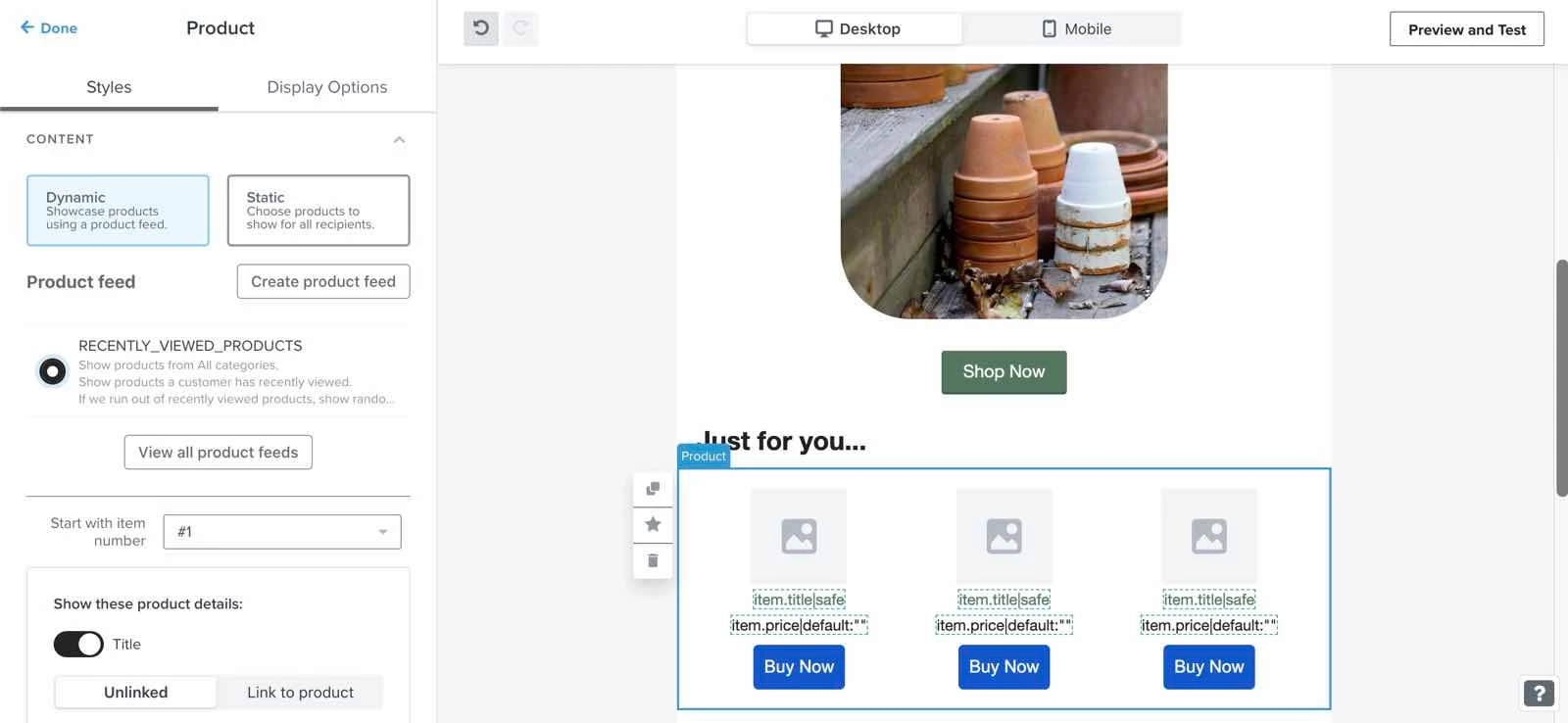
“For brands using Klaviyo, we recommend that you split your flow by category. Especially if you have a product that could benefit from some education, put category browsers at an advantage by showing them the product they viewed, the benefits of that type of product, or even a comparison chart. They don't buy that exact product, but they may get the information they need to upgrade to the higher-priced version you offer. Remember, most brands have a browse strategy; the goal is to make yours feel personal.”
- Morgan Mulloy, Senior Client Partner at Avex Designs
Best practices for all email platforms
You get consistent results across any ESP only when your browse flow runs within a controlled system. That means coordinated rules, clean data, and predictable behavior across every platform you use.
Some best practices that you should follow when deploying browse abandonment email automation software are:
- Keep one global frequency cap across your entire stack: No ESP should run its own limits. Set a single ceiling that covers welcome, browse, product, cart, and post-purchase. This ensures that your email autoresponder for browser abandonment doesn’t collide with other automations.
- Use shared suppressions and cross-flow logic: A complaint, a hard bounce, or a no-engagement threshold should pause all flows across all platforms. This protects deliverability when you run browse abandonment email software alongside other automations.
- Name documents and data contracts clearly: Keep triggers, events, and flow names consistent across Klaviyo, Mailchimp, SFMC, HubSpot, or any custom CDP. This makes downstream analytics readable and prevents accidental double-fires when multiple platforms listen to the same event.
- Push server-side viewed events to every platform that needs them: Legacy ESPs often handle client-side events inconsistently. Use server-side signals so you don’t lose browse triggers when cookies fail or when the platform throttles front-end tracking.
- Adjust rules for platform-specific behavior:
- Klaviyo: Needs mutex rules so cart overrides browse cleanly.
- Braze: Coordinate email, SMS, push, and in-app messaging through a shared frequency cap. Browse abandonment should act as one touchpoint within a broader customer journey, not an isolated campaign.
- Bloomreach: Use real-time product and behavioral data to suppress stale recommendations. Browse abandonment content should reflect the visitor's latest session, not products viewed days earlier.
- SFMC: Must QA authentication and warm-up sequences before enabling early-intent flows.
- HubSpot: Deduplicate behavioral events, or you’ll over-trigger browse flows during variant switching.
- Audit your flow every quarter: Platforms update throttling, engagement models, and routing rules without notice. Validate timing, suppressions, and trigger logic so your browse flow behaves the same way across your entire CRM stack.
Legal and compliance
You need to treat browse abandonment as behavioral processing, which means your privacy notice, consent model, and opt-out controls must align with your flow. This protects deliverability and keeps you compliant across regions. Some ways to do this are:
- Cover behavioral triggers in your privacy notice: Make it clear that you track on-site browsing and use those signals to send follow-ups. This matters for the legality of browse abandonment emails, especially in regions that treat behavioral data as sensitive.
- State the lawful basis for processing where required: If you rely on consent, make sure you’ve collected real consent, and collected on-site with clear wording. If you use legitimate interest, document your balancing test and explain the purpose. This keeps your browse abandonment email compliant across GDPR-aligned markets.
- Include one-click list-unsubscribe: Gmail and Yahoo treat it as mandatory for promotional traffic. It lowers complaints and reduces the chance that early-intent flows damage the sender's reputation.
- Honor opt-outs fast: Suppress the profile across all flows within minutes, not days. Delayed suppression is one of the top causes of complaints, and complaints punish your entire automation system.
- Give shoppers clarity on what they can expect: If your flow uses price drops, restocks, or product-level updates, mention these categories in your privacy notice. Ambiguity creates risk and invites complaints.
Turn early intent into revenue with better identity and cleaner signals
Browse abandonment only works when you fix the upstream problems, like weak identity, noisy triggers, and timing rules that ignore real behavior. When you tighten those inputs, your browse flows become predictable, scalable, and safe for your domain, and you reach the shoppers who never make it to the cart.
This is where Tie changes the outcome. Tie identifies a much larger share of your browse traffic, enriches those visitors with verified data, and feeds cleaner signals into your ESP. That means:
- More eligible users for your browse flow.
- Higher-quality events for intent scoring.
- Cleaner send logic that protects inbox placement.
- Stronger performance across every early-intent touch.
Instead of sending “you viewed this” to a narrow audience, run a system that reaches more real shoppers with better information and fewer risks.
Want to see how Tie can expand your reach and convert more early-intent visitors into revenue? Book a demo.